
Architecture
One inspectable LCA engine, several ways to use it
VoLCA separates the LCA engine from the surfaces around it. You can explore it through VoLCA’s own UI, integrate it into another product, automate it from scripts, or run it in controlled infrastructure with your own data boundaries.
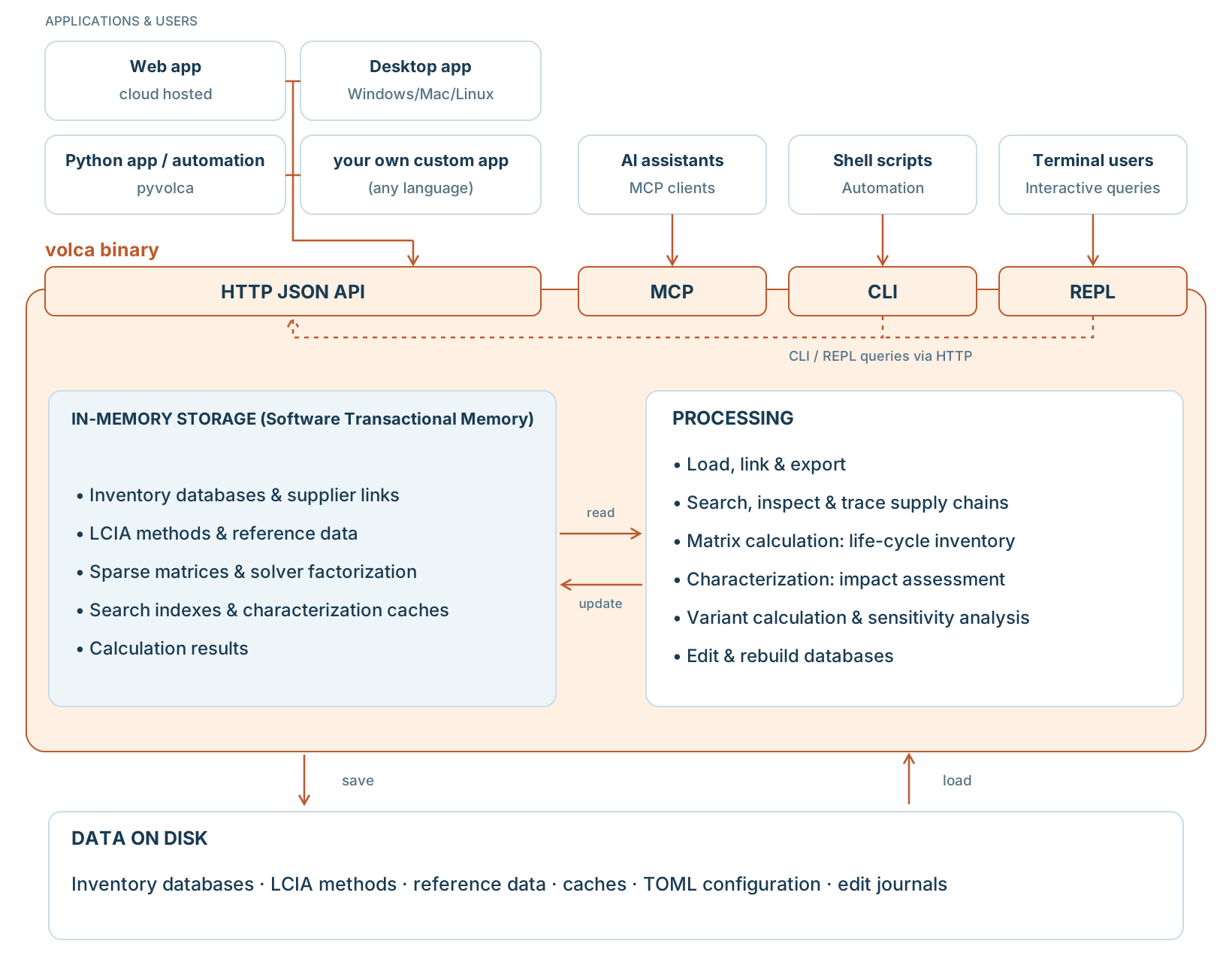
Inside the engine, beside the engine
Search, inspect, compute, trace, compare, and expose environmental data through consistent entry points.
The volca executable contains the HTTP API and MCP server, CLI and REPL modes, and shared loading, inspection and calculation operations. It also carries reference tables for flow synonyms, compartments, units, energy densities and geographies, and Plain indicators, a method built from data/methods/plain-indicators.csv that counts physical quantities with characterization factors equal to 1. Loaded databases, search indexes and calculation matrices are held in memory.
volca.toml configures the engine and the files it loads. Optional chemical synonyms are supplied as a separate file. Edit journals and caches are created during use.
Inventory databases, including CSV datasets, and other LCIA methods are supplied separately. Flow mappings can be customized; private data and public demo data follow the same loading path, with their own access and licensing conditions.
What this means in practice
Explore
Use VoLCA’s own interfaces
Start with the hosted web UI or desktop app to browse activities, inspect records, and follow results back to their sources.
Integrate
Call the same engine from your tools
Use the HTTP API, Python client, CLI, or MCP tools when VoLCA needs to sit behind a dashboard, workflow, notebook, or agent.
Control
Keep data boundaries explicit
Public examples can demonstrate the workflow, while private or licensed data stays in deployment contexts where you control access and obligations.
Common integration patterns
VoLCA as the application
- Use the web UI or desktop application directly.
- Inspect records, inventories, impacts, mappings, and traces without building another interface first.
- Good for evaluation, internal analysis, and transparent review workflows.
VoLCA behind a business interface
- Your product owns user journeys, permissions, reporting, and domain language.
- VoLCA provides the environmental data layer and computation endpoints.
- Good when users should not have to learn a generic LCA tool.
VoLCA for automation and agents
- Use Python, CLI, or MCP to connect repeatable workflows to inspectable LCA data.
- Keep answers grounded in real records instead of disconnected summaries.
- Good for audits, batch checks, notebooks, and assistant workflows.
Deployment and data boundary
Public demo data
Use legal public or demo datasets to understand the product and prove workflows without depending on private database access.
Private or licensed data
Bring controlled data into deployments where licensing, access control, and infrastructure boundaries are explicit.
Hosted or self-hosted paths
Choose the operating model that matches your evaluation stage, integration needs, and data constraints.
FAQ
Is VoLCA only a web app?
No. The web UI is one surface. The same engine can also be reached through desktop, HTTP API, Python, CLI, and MCP workflows.
Can another interface use VoLCA?
Yes. VoLCA can sit behind a dedicated business interface when the project needs custom UX, terminology, permissions, or reporting.
Does VoLCA include every database by default?
No. Public examples and private or licensed datasets are separate. VoLCA makes the engine and workflows inspectable; data access depends on the deployment and rights.