
Adjusting energy consumption or replacing a process supplier is common in LCA. But when you send the modified database to a colleague, how do you also explain what changed?
In VoLCA, these steps form one workflow: edit the data, keep a record of the changes and include it in the export.
Edit without rewriting the source
You can work on a copy of a database, create processes or edit their exchanges: change an amount, add an input or remove an emission. A targeted edit leaves the process’s other information in place.
The source files are not rewritten. Changes are recorded separately and reapplied when the database is loaded.
See what changed
The change journal records operations and the values they replaced. You can attach a note to explain a correction or justify an assumption.
The history lets you read through the changes in order, rather than reconstructing the differences between two files.
Two entries from the test database:
Input “glue”: amount changed from 0.1 to 0.2 kg. Reason: “Demonstrate a quantity correction (test data)”.
Process name: set to “Sawnwood example”. Reason: “Clarify the activity name (test data)”.
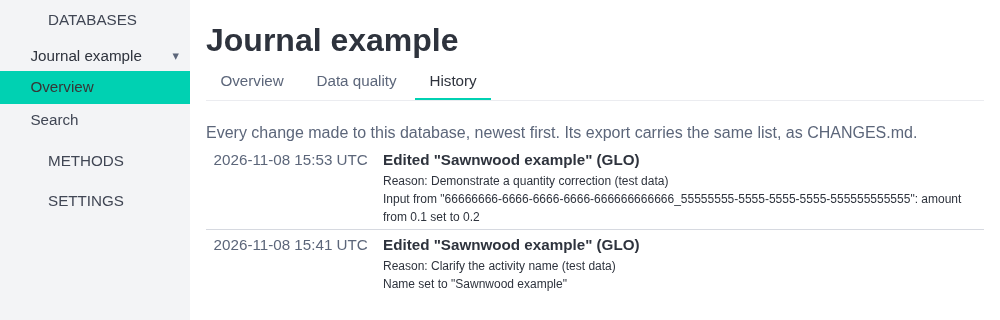
The journal shows the most recent changes first, with their values and reasons.
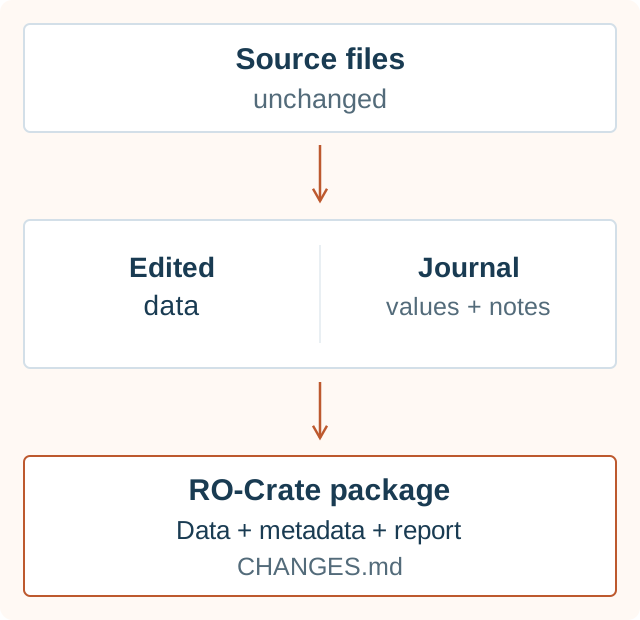
Share the data with their history
A modified database is exported as an RO-Crate package: an archive containing the data and structured metadata describing their provenance, licence and identity.
CHANGES.md is the readable report of the journal, included in the export with the notes provided. An excerpt for the name change above:
Reason: Clarify the activity name (test data)
- Name set to "Sawnwood example"
The full report for this example also contains the amount change. The package distinguishes the original data from subsequent changes. The licence conditions still apply.
The recipient therefore gets the modified data and the information needed to understand how they were adapted.
On the hosted service, corrections can also be proposed against an identified published release. The publisher recognised for that release can accept or refuse each change, giving a reason for a refusal. Acceptance does not automatically modify the published database.
Sources: writing and the technical journal since 0.9.5, RO-Crate packages since 0.15.0, documented history and an exported change report since 0.16.0.